

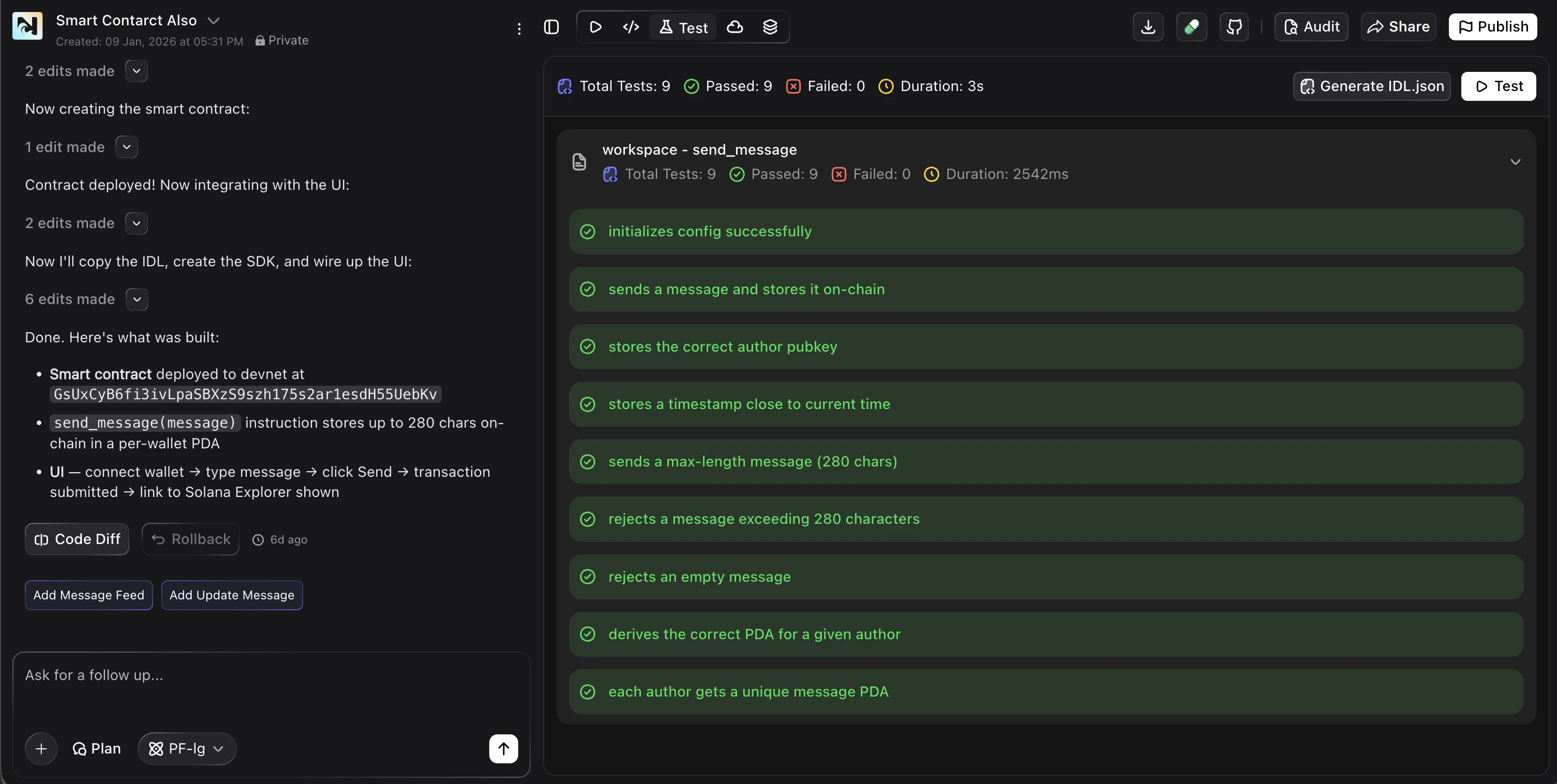
How Testing Works in Noah
When you create a smart contract, Noah automatically:- Generates comprehensive test cases based on your contract logic
- Compiles your contract to check for errors
- Runs all test cases and displays results
- Shows pass/fail status, total count, and duration
What Noah Tests
Noah generates test cases that cover common smart contract scenarios:- Initialization — verifies the contract sets up correctly
- Core functionality — tests the main instructions and logic
- Input validation — checks that invalid inputs are rejected
- Edge cases — tests boundary conditions like max lengths and empty values
- Account handling — verifies correct account derivation and ownership
- Error handling — ensures the contract fails gracefully on bad input
Running Tests
Build Your Smart Contract
Describe your smart contract to Noah using a prompt. Noah generates the contract code automatically.
View Test Results
Switch to the Test tab in the toolbar to see auto-generated test results. You’ll see total tests, passed, failed, and duration.
Fix Issues
If any tests fail, ask Noah to fix the issue. Describe the failing test or the expected behavior, and Noah will update the contract.
Test Results Overview
The test interface shows you:- Total Tests — number of test cases generated
- Passed — tests that completed successfully
- Failed — tests that did not produce expected results
- Duration — how long the test suite took to run
Generate IDL
After your tests pass, you can generate the IDL (Interface Definition Language) file for your Solana program by clicking Generate IDL.json. The IDL is required for integrating your smart contract with your web app.Best Practices
Always test before deploying
Always test before deploying
Run all test cases and make sure they pass before deploying to Devnet or Mainnet. This catches bugs early and saves time and gas fees.
Test on Devnet first
Test on Devnet first
Deploy to Devnet and test your contract in a real environment before going to Mainnet. This is standard practice in blockchain development.
Ask Noah for more tests
Ask Noah for more tests
If you want to test specific scenarios, ask Noah to generate additional test cases. For example: “Add a test that verifies the token transfer fails when the balance is zero.”
Review the audit report
Review the audit report
After testing, generate an audit report to check for security vulnerabilities and best practices.
FAQ
Are tests generated automatically?
Are tests generated automatically?
Yes. When you build a smart contract, Noah automatically generates and runs test cases for your contract’s logic.
Can I add custom test cases?
Can I add custom test cases?
Yes. Ask Noah in the chat to add specific test cases, and it will generate them for your contract.
Do tests cost credits?
Do tests cost credits?
Running tests is part of the smart contract development flow and uses credits as part of your build process.
Are tests only for smart contracts?
Are tests only for smart contracts?
Currently, the Test tab and automated test generation are available for smart contracts (Solana programs and Solidity contracts).