

Track user behavior and product usage with Mixpanel.Mixpanel is a product analytics platform for tracking user actions (events),
identifying users, and understanding how people interact with your app over time.When you connect Mixpanel to Noah, you can measure what users do inside your app,
build conversion funnels, analyze retention, and segment users by behavior.Prerequisites:
- A Noah account with a project you can deploy.
- A Mixpanel account (free up to 20M events/month).
- A live URL for your app (tracking is most accurate on deployed projects).
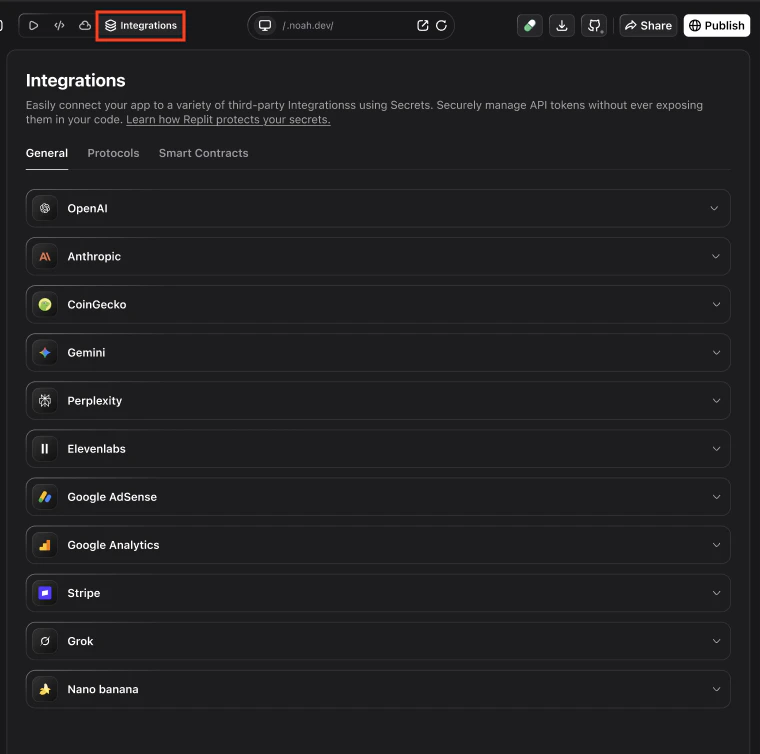
{{mixpanel_project_token}}, and save. After it is connected in the Noah UI, continue with the steps below to configure tracking in your app.
CRITICAL prerequisites
Before you integrate Mixpanel with a Noah-generated React application, you need your Mixpanel Project Token.- Configure your Mixpanel project settings.
- Ask the user (or provide yourself) the Mixpanel Project Token.
What you can use it for
Track specific user actions
Track specific user actions
Measure exactly what users do inside your app: button clicks, feature usage,
form submissions, purchases, or any custom action you define.Prompt Noah with something like:
Build conversion funnels
Build conversion funnels
See where users drop off in multi-step flows like signup, checkout, or onboarding.
Mixpanel funnels show you exactly which step loses the most users.Prompt Noah with something like:
Identify users and build profiles
Identify users and build profiles
Link all events to a specific user so you can see their full journey.
Attach profile properties like name, email, plan, and wallet address.Prompt Noah with something like:
Analyze retention
Analyze retention
Understand how often users come back. Mixpanel’s retention reports show you
which cohorts return after their first visit and which features drive stickiness.Prompt Noah with something like:
Set super properties for every event
Set super properties for every event
Attach properties like user info or session context to every event automatically.
Super properties are set once and included in all subsequent tracking calls.Prompt Noah with something like:
Before you start
You will need:- A Mixpanel account (free tier available)
- A Mixpanel project for your Noah app
- The Project Token from your project settings
Get your Project Token
Your Project Token is a unique identifier for your Mixpanel project. You can find it in your project settings.Open the Mixpanel docs to find your Project Token.
Connect Mixpanel to Noah
You connect Mixpanel by creating a project, copying the Project Token, and adding it to your Noah project settings. After that, you can describe what you want to track in chat and let Noah update your app code for you.Create or open a Mixpanel project
Go to Mixpanel and either:
- Create a new project for your Noah app, or
- Open an existing project you want to use
Copy the Project Token
In your Mixpanel project:
- Navigate to Settings → Project Settings
- Find the Project Token
- Copy this token
Add the Project Token in Noah
In Noah:
- Open your project.
- Go to the project Settings → Integrations section.
- Find the Mixpanel integration card.
- Paste your Project Token into the input field.
- Click Save to complete setup.
Track key events
Noah can emit custom Mixpanel events for you. Common events for a Noah app might include:sign_up– when a user creates an accountwallet_connected– when a user connects a walletfeature_used– when a user interacts with a key featurepurchase_completed– when a user completes a payment
Prompt cookbook
Copy-paste these prompts in Noah after connecting Mixpanel to track common metrics:| Use case | Prompt |
|---|---|
| Page views | Track page views automatically in Mixpanel for every route change. |
| Button clicks | Track clicks on the "Sign Up" and "Connect Wallet" buttons as Mixpanel events. |
| User identification | Identify users in Mixpanel after login with their ID, name, and email. |
| Super properties | Register Mixpanel super properties for user name, email, and wallet after login. |
| Funnel tracking | Track Mixpanel events for each onboarding step so I can build a conversion funnel. |
| Feature usage | Track a Mixpanel event when users use the search feature, including the query term. |
| Purchase tracking | Track completed purchases in Mixpanel with amount, plan type, and payment method. |
| Error tracking | Send a Mixpanel event when API errors occur, including the error code and endpoint. |
| Retention events | Track daily active usage events in Mixpanel so I can build retention reports. |
| User properties | Set Mixpanel user profile properties for plan type and signup date when users log in. |
Next steps
- Build funnels to understand where users drop off in key flows.
- Use retention reports to see how often users come back.
- Create user segments based on behavior to target specific groups.
Tips and limitations
- Tracking is most accurate on deployed projects. Mixpanel may not behave the same on local previews.
- Events appear in near real-time. Live View updates within seconds.
- Free tier covers 20M events/month. Sufficient for most Noah apps.
- Ad blockers may prevent tracking. Some users run browser extensions that block analytics scripts.
- One Project Token per project. Each Noah project should use a single Mixpanel project for clean reporting.
FAQ
Is Mixpanel free?
Is Mixpanel free?
Yes. Mixpanel offers a free plan that includes up to 20 million events per month, unlimited data history, and all core reports (funnels, retention, flows). This is sufficient for most Noah-generated apps.
I added my Project Token, but I do not see events. What should I check?
I added my Project Token, but I do not see events. What should I check?
- Make sure you deployed or published the latest version of your app after configuring Mixpanel in Noah.
- Confirm that the Project Token in Noah exactly matches the one shown in Mixpanel.
- Open your app in an incognito window and check Activity → Live View in Mixpanel while you interact.
- If your site uses ad blockers or tracking protection, try from a different browser or device.
Can I use Mixpanel together with Google Analytics?
Can I use Mixpanel together with Google Analytics?
Yes. Many teams use Google Analytics for traffic and acquisition insights (where users come from) and Mixpanel for product analytics (what users do inside the app). They complement each other and can coexist on the same Noah-generated app.
What is the difference between identify and super properties?
What is the difference between identify and super properties?
Identify links events to a specific user and sets profile properties visible in user profiles. Super properties are key-value pairs attached to every future event automatically — useful for context like user name or wallet address that you want on every event without repeating it.
What’s next?
Google Analytics
Track traffic sources, page views, and audience insights.
AdSense
Monetize your traffic with Google AdSense display ads.