

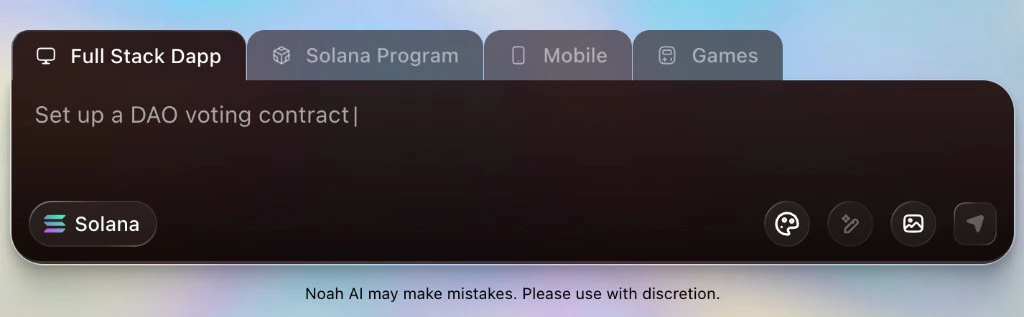
The Noah prompt box
The prompt box is where you tell Noah what to build. It has two main parts:- Modes (tabs at the top)
- Action icons (buttons on the right side)
Modes
Use modes to tell Noah what kind of project you want. Each mode tunes how Noah structures the output, scaffolds files, and thinks about the user experience.- Full Stack Dapp: Ask for full web dapps that include smart contracts, frontend, and basic backend glue. Great when you want Noah to design the full experience from wallet connect to on‑chain actions.
- Solana Program: Focus on on‑chain logic only. Use this mode when you care most about the program accounts, instructions, and security, and you plan to wire the UI yourself or later.
- Mobile: Generate mobile-first apps that talk to your contracts or web APIs. Use this mode when the primary surface is iOS/Android rather than a browser.
- Games: Ask for game-like experiences (on-chain or off-chain) such as loot systems, turn-based logic, or casual mini‑games. Noah will bias towards game loops, entities, and state updates.
Action icons
The icons on the right side of the prompt box unlock extra power:- Style and UX controls: Ask Noah to focus on design details such as layout, theming, or animations without rewriting your business logic.
- Attachments: Attach files or other context when you need Noah to respect an existing codebase, API schema, or design spec.
Core prompting principles in Noah
1. Lead with the user goal
Start every prompt by explaining what your end user is trying to do, not just what code you want. Bad:2. Specify chain and contract surface
Tell Noah which chain you are targeting and what the contract should expose:- Program or contract type (e.g. Solana program)
- Key instructions / methods
- Accounts, PDAs, or state you need
- Events or logs that off‑chain clients will consume
3. Describe UI and integrations
For Full Stack Dapp or Mobile modes, include how users interact with the system:- Wallet flow (connect, sign, network errors)
- Main screens or tabs
- Any external APIs, indexers, or backends Noah should integrate with
4. Add acceptance criteria
Tell Noah how you will decide if the result is “done”:- Performance or latency expectations
- Error states that must be handled
- Tests that must pass
Prompt patterns you can copy
Use these starting points and adapt the details to your project.Full Stack Dapp prompt
Solana Program prompt
Mobile app prompt
Games prompt
FAQ
How detailed should my prompts be?
How detailed should my prompts be?
Include the user’s goal, the chain and contract surface, any important UI flows or integrations, and clear acceptance criteria. More context helps Noah make better architectural and UX decisions.
Do I have to use a specific mode?
Do I have to use a specific mode?
No. You can switch between modes at any time. Choose the mode that best
matches what you are asking for (for example, Full Stack Dapp, Solana Program,
Mobile, or Games) and adjust if the project shape feels wrong.
Can I iterate on a prompt after Noah generates code?
Can I iterate on a prompt after Noah generates code?
Yes. You can keep refining by sending follow-up prompts that describe what
should change, such as adjusting UI layout, updating business rules, or
extending on-chain logic. Noah will update the project based on your new
instructions.
How do I make sure the generated contracts are safe to use?
How do I make sure the generated contracts are safe to use?
Always review generated smart contracts, tests, and deployment scripts before
using them with real funds. Treat Noah’s output as a starting point and apply
your own security reviews and best practices.
What should I do if Noah’s output is far from what I want?
What should I do if Noah’s output is far from what I want?
Copy your last prompt, highlight what was unclear or missing, and send a revised version with more explicit requirements. Iterating on the prompt almost always leads to significantly better results.